Outlook Mobile App Shared Mailbox Access/Use
To access a shared mailbox on a mobile device, use the following steps.
Sign in to your primary account in Outlook for iOS or Android.
Tap the Add Accountbutton in the left navigation pane, then tap Add a Shared Mailbox.
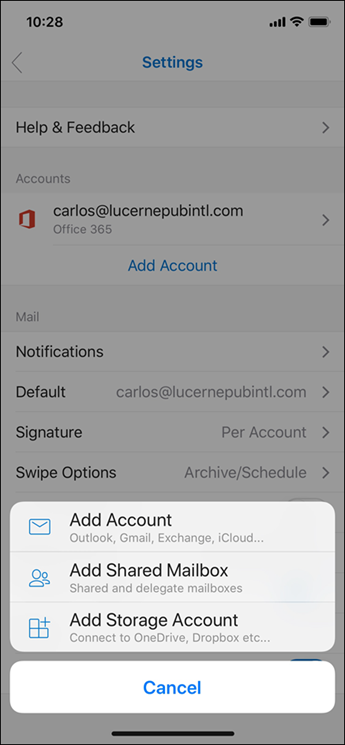
If you have multiple accounts in Outlook Mobile, select the account that has permissions to access the shared mailbox.
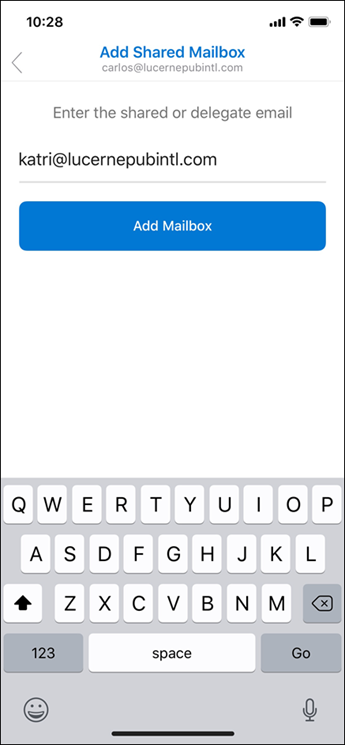
After the account setup process completes, the shared mailbox will display in your account list in Outlook for iOS or Outlook for Android.
To remove a shared mailbox, go to Settings > Accounts. Then tap on the shared mailbox and select Delete Account.
Related Articles
Outlook Desktop Shared Mailbox Access/Use
If you don't see the shared email folder, wait a couple of minutes, close, and then restart your Outlook app. All emails sent to the shared email address will show up in this folder. Your shared mailboxes will be listed on the left window, you may ...(New) Using Outlook's Junk Email
Email is automatically removed from the Junk Email folder after 14 days and can't be recovered after that. TCIT Email Security works with Office 365 junk email rules. If you want to block a sender (and send their messages to the junk email folder) ...Internet Explorer End of Life - 6/15/22
Starting June 15, 2022, Microsoft will gradually transition users from the unsupported IE11 desktop app to Microsoft Edge. The IE11 desktop app will be progressively redirected to Microsoft Edge over several months. Additionally, the IE11 desktop app ...Bracket File Transfer and Upload
Go to:https://bracket.email/ Enter your email address and click Next On the confirmation, email click Sign In To share a file click New Share on the left You can also get a sharing link from here that you can use to send to contacts to enable them to ...Office 2013 End of Life - 4/11/23
Office 2013will reach the end of support on April 11, 2023. After this date, support for Office 2013 will end andsecurity updates will no longer be available, per theFixed Lifecycle Policy. This may increase your organization's exposure to security ...